Local-first YouTube metadata translation

YT Localizer

YT Localizer by Vagabondity Walks

A free-to-use, source-available YouTube metadata translator for safely translating video titles and descriptions on your own computer. Simple and powerful.

NO SUBSCRIPTIONS OR FEESSetting up to localize takes just 10 minutes!
Open setup guide

No middlemen, no need to pay anything and no YT Localizer account.
You use your own Google or DeepL accounts.

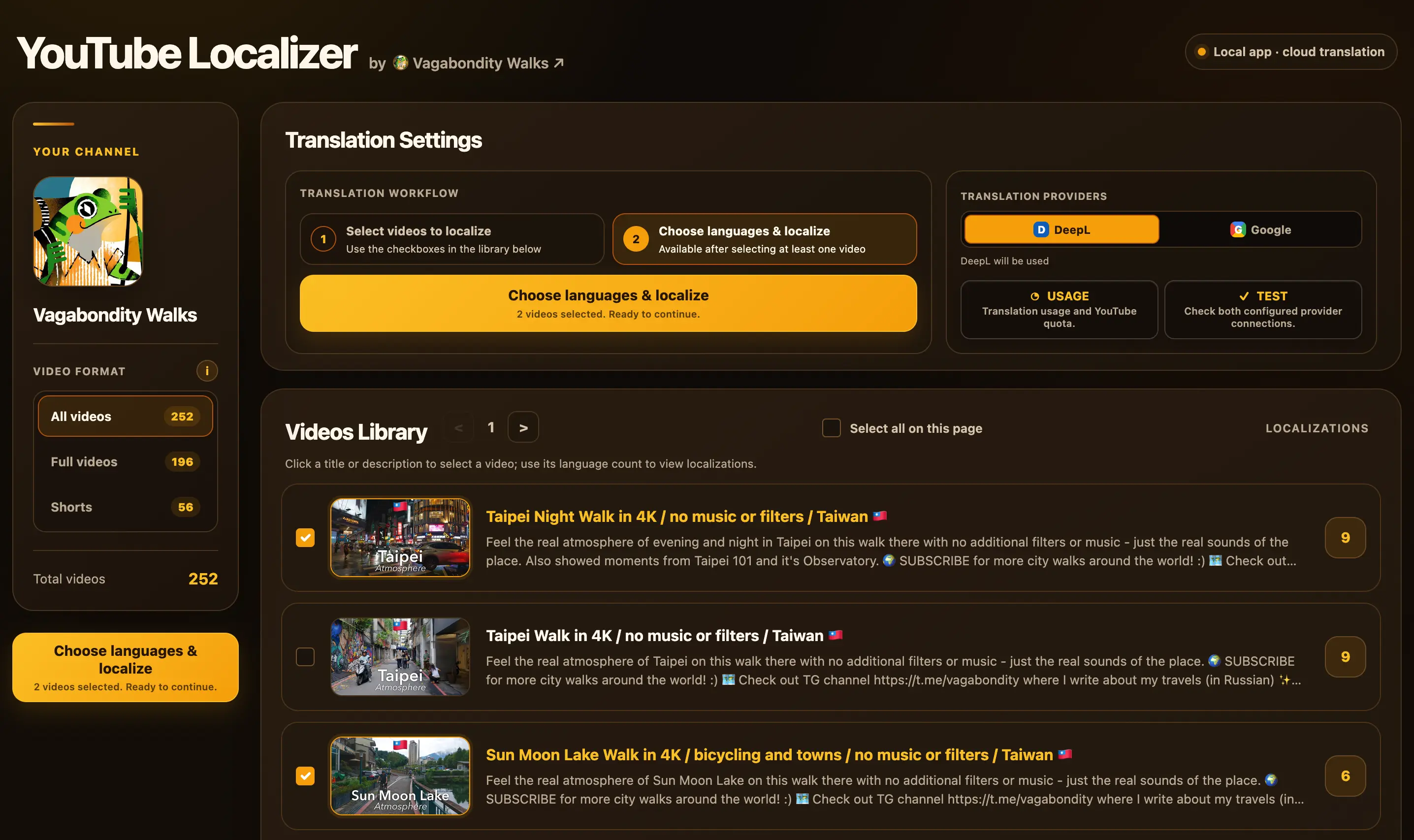
YT Localizer video library showing channel videos, filters, translation provider controls, and localization status
Functional app interface for your localizations

Why should you localize locally on your PC?

Because you don't want to hand your channel to a service you cannot inspect and, hence, really trust.

Services translating titles and descriptions automatically always require a YouTube permissions which cover more than just access to metadata - permissions include changing channel content and permanently deleting videos. To use an any website like that, you must trust its servers, its private code, authors and everyone who can access them.
Will you?

❌ Real risks with any 3rd party service ❌

  • Your channel token is processed or stored on infrastructure you do not control.
  • You cannot inspect what its closed server code does with that access.
  • An update, ownership change, or security breach may put your channel at risk.
  • Some of such services share no information about their developers, so they are basically anonymous.

✅ What YT Localizer gives you ✅

  • The app runs on your computer and connects directly to YouTube and your chosen translator.
  • Your credentials stay in local files, with no YT Localizer account or intermediary server.
  • It's source code and logic is completely open and available for anybody to inspect.
  • The identity of author is known and you can always reach out with feedback or questions.

Features

Localize in batches

Translate one video, selected videos, the current page, or the entire channel in one run.

Keep access local and safe

Your OAuth token, settings, and provider keys stay in local files on your computer and don't leave it.

Choose your translator

Use your own DeepL or Google Cloud Translation account (both with generious free usage limits) for each localization run.

Live progress tracking

Follow every video-and-language pair as it is processed, including published, skipped, and failed localizations with their reasons.

No need to pay at all

YT Localizer has no fee or subscription. Translation providers offer generous free allowances that are usually enough for hundreds of video localizations; paid usage matters only for much larger volumes.

Original content protection

The original video, thumbnail, title, and description remain unchanged; only additional language localizations are published. You can also check the main language for the video explicitly.

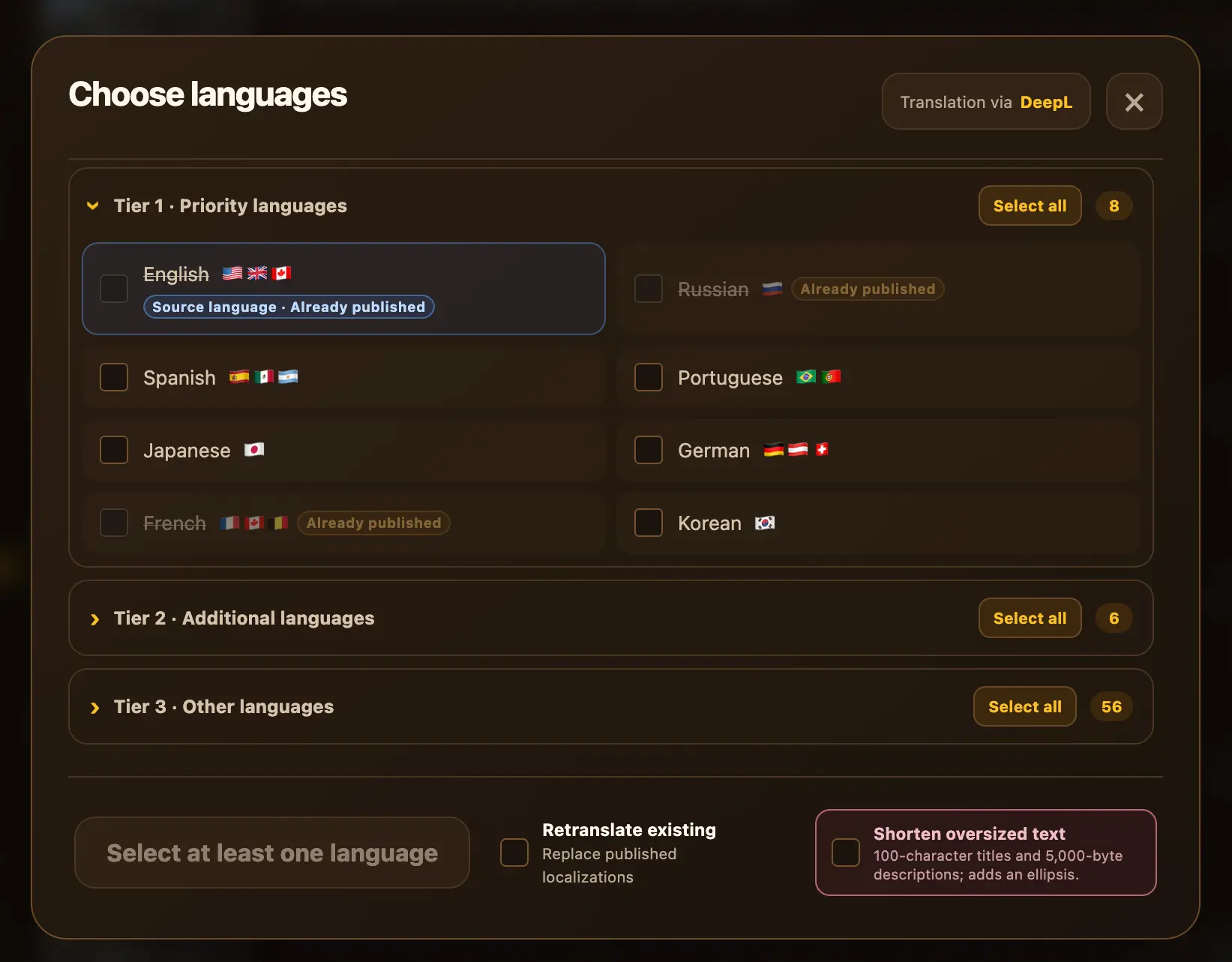
Choose languages with context

See what already exists before localizing anything.

Review source languages, provider compatibility, and existing localizations. Existing translations are skipped unless you deliberately choose to replace them.

  • Unsupported language combinations are disabled.
  • Categories of languages help you find the best markets.
  • Full-length videos and Shorts can be filtered separately.
  • Provider connections can be tested before a real run.
  • Usage and YouTube quota information remain visible.
YT Localizer language selector showing available languages and existing localizations
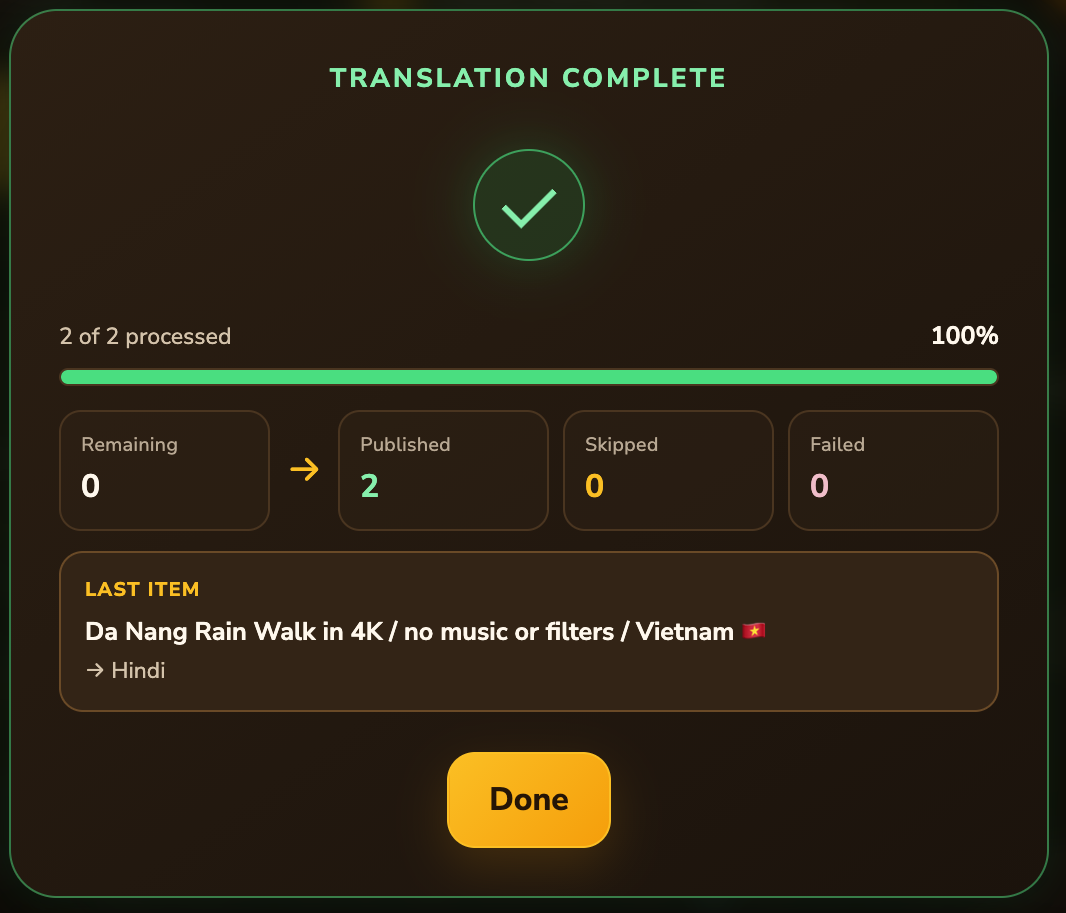
YT Localizer result window showing published, skipped, failed, and remaining localization totals

Monitor translations and review every result

Finish with a clear picture of what happened.

See exactly how each localization run goes and how it ended, no need to rely on generic windows and success messages. The result window keeps successful publications, skips, and problems easy to distinguish - and fix, if needed.

  • Published, skipped, failed, and remaining items have separate totals.
  • You always see which video is being translated right now - and to which language.
  • Skipped and failed items are grouped by reason with videos listed.
  • Partial runs, shortened text, quota stops, and cancellations are reported explicitly.

Frequently Asked Questions

Who is the author of YT Localizer?

YT Localizer is created by a single developer Dmitrii Polovinkin (me!). I work professionaly in IT as data engineer for 7+ years, experienced traveler, and I'm also a content creator - I make city walk videos on my channel Vagabondity Walks, showing atmosphere or most places I visit. Hence the name :)

YT Localizer was originally created as a solution to translate my own 200+ videos to various world languages, as I didn't find a suitable tool - and I realized it would be a great idea to also prepare it in such a way, so other creators could use it to localize their videos too!

What YouTube metadata can YT Localizer translate?

This app has a simple goal - it translates YouTube video metadata (titles and descriptions) and publishes additional language versions through YouTube's localization fields. The original video, thumbnail, source title, and source description remain unchanged.

Existing localizations are skipped by default. Replacing them requires deliberately enabling the option to retranslate existing languages, which is a special feature and toggle we have.

For now, YT Localizer by Vagabondity doesn't have localization for anything other than titles and descriptions.

Why do I need to bother to set up a YouTube localization tool to run this locally? (important, as it's main point of this app)

The answer is very simple to me. If you are a content creator, YouTube channel is an important and valuable project to you - it may be a creative archive, a project built over years - or even your whole profession! You then have to know, that YouTube does not provide a permission limited only to title and description localizations.

This is important: the authorization which is used to update video metadata also includes permission to change your content and permanently delete videos from your channel. All such services will ask you to log in with a permission to, quoting here: "see, edit and permanently delete" YouTube videos, ratings, comments and captions".

Me personally, as a creator too, I would never give such an access to any third-party tool. Sure, most likely they will not do anything bad or delete your videos. But firstly - you still can't be sure. And secondly - they may not have this right now, but there is no guarantee that it will stay this way - it can change without notice if owners change, or there is a security breach in a service. And all of services which do this, which I've seen - I don't trust them.

So YT Localizer solves this problem, as it lets you create and manage everything yourself, which is not hard to do, really! Using this app, you will not give any random hosted service, which you can't check control, a potentially very destructive the access to your channel. The app runs only on your own computer and connects directly to YouTube and the translation provider you choose. You literally connect to your own instance of Google Cloud, to your own app instance!
How difficult is it to set it up? Do I need to be a programmer?

Not hard at all actually, it usually takes about 10 minutes and requires no developer or IT experience! Most of the time is spent creating your own Google Cloud project, OAuth client, and translation-provider access. If you don't know what it means - it's not a big deal and setup will explain every step.

But those steps are necessary to ensure only use have the access and control of your channel, nobody else. And after setup, starting the app only takes a single Terminal command. The step-by-step setup guide includes separate clear instructions for macOS and Windows.

Do I need to pay anything? Is it really free?

Yes, it's totally free! You don't have to pay anything to use YT Localizer to it's fullest extent! It has no purchase price, no subscription fee (do you really need another one in your life?), or any app-imposed limits which basically all third-party services have! Translation providers offer generous free allowances that are usually enough for literally many hundreds of video localizations (with just DeepL you'll have a million symbols for free). Me, a YT Localizer developer myself used this tool to make several thousands translations for my own channel.

But overall - getting started and using the app at normal volumes is effectively completely free for you. You only may need to consider paid provider usage when translating at much larger volumes, and it may be required for some channels. Provider plans and free allowances can change, so check the current terms of the plan you choose before starting a large batch.

Why does Google show broad YouTube permissions?

As I've mentioned in a previous question, YouTube does not offer a narrow permission specifically for localization fields. The scope accepted for updating video metadata can also authorize actions such as video deletion.

But what's crucial here - the source code of YT Localizer, unlike other services found online, is completely publicly inspectable and contains no video-deletion API calls - you can see all the code! YT Localizer updates localization fields only - it does not upload, replace, or delete videos.

Does YT Localizer collect any data?

No. YT Localizer has no built-in analytics or telemetry (again, you can check the code) and does not send usage information, channel details, credentials, or translation history to a YT Localizer server or any server whatsoever.

Usage counters and application settings are stored locally on your computer. Only the data required to perform a localization is sent directly to the services you configure: your chosen translation provider and YouTube itself.

Is YT Localizer open source?

It is source-available, free-to-use proprietary software, but not open source under the OSI definition. What it means, is that the source is public so you can inspect the logic and how credentials and YouTube access are handled. You may download and run the unmodified app at no charge for channels you own or are authorized to manage. But redistribution, resale, rebranding, modified releases, competing products, and offering it as a hosted service are restricted. Your translations and other output remain yours to use and monetize.

Read the complete license

Which translation provider should I use?

DeepL is the simplest starting option because it requires only an API key, has a big free allowance and you don't even have to connect your bank card there. Google Cloud Translation is also supported and uses a service-account JSON key, but you have to have billing enabled in your Google Cloud project to use it (we have a protection inside an app to make sure you won't go over the limit).

You can configure either provider or both, test their connections, and select the provider for each localization run.

Are there translation or YouTube limits?

YT Localizer does not impose any usage cap. Translation volume depends on your provider plan. For Google Cloud Translation, a local safety limit stops requests at 490,000 characters per month by default; you can disable it in the app's Usage section to allow paid translations.

Publishing depends on your YouTube Data API quota. The standard allowance is 10,000 units per day, although your project may have a different limit. YT Localizer uses about 51 units per selected video when publishing a localization batch.

Check your current limits and usage: DeepL API keys & limits , Google Translation quotas & limits , YouTube exact usage & quota , and YouTube quota costs .

If the YouTube quota is exhausted, the app enters a limited mode, keeps cached channel data available, shows the expected reset time, and lets you reconnect after access is restored.

What runs on my computer? (technical answer)

uv downloads a managed Python 3.12 installation if needed and creates an isolated .venv with the exact dependency versions recorded in uv.lock. It does not replace your system Python.

The Flask interface listens only on 127.0.0.1:5050, so it can be opened only from your computer. The app runs only while the Terminal command is running — press Ctrl+C to stop it. It does not install a background service or start automatically with your computer.

Your browser communicates with the local Flask app. The app then makes outbound connections directly to Google/YouTube and the translation provider you selected. There is no YT Localizer cloud server between them.

Credentials and settings remain in local files such as config/settings.toml, Google credential JSON files, and token.pickle. The video library cache is kept in memory and disappears when the app stops; the local Google usage counter is stored in config/usage.json.

These private files are excluded by .gitignore to help prevent accidental commits, but they are not encrypted by YT Localizer and should never be published or shared.

How is this different from hosted services such as ReTranslate.ai, Creator Tools, or UNmiss?
  • Access: YT Localizer uses your own OAuth client locally instead of granting channel access to a hosted localizer.
  • Transparency: its complete application source can be inspected.
  • Limits: the app has no subscription or app-imposed translation cap; provider and YouTube quotas still apply.
  • Workflow: it supports multi-video batches, provider compatibility checks, and detailed results for every attempted localization.

The tradeoff here is that you have to complete the one-time local setup yourself. YT Localizer also focuses specifically on video titles and descriptions; it does not translate subtitles, channel metadata, or playlist metadata. It also doesn't have some functionality that some of those apps have (which I personally don't really see as necessary).

Compare with ReTranslate.ai

Compare with Creator Tools

Compare with UNmiss

Where can I report a problem or ask for help?

Feel free to create a GitHub Issue and include all the details and also the full error shown in Terminal plus the steps that led to it.

Please, don't include API keys, OAuth credential files, settings.toml, or token.pickle - it's all private.

Try it on one video.

Follow the setup guide, test one language, and scale up when you are happy with the result.